
STOMA AI • DiagnoSee - Clinic
Clinic software that just works — built for modern dental teams.
DiagnoSee-Clinic unifies appointments, imaging, AI consultation, billing, and patient experience into a single, WhatsApp-ready platform.
Appointments, Billing & Prescriptions — in minutes
Clinic-first workflows tuned for Indian dental practices.
AI-driven diagnosis & imaging
Stoma AI + intraoral + X-ray/CT analysis for faster, accurate care.
DiagnoSee - Clinic, powered by STOMA AI
Bring dashboard, appointments, AI consultation, imaging, billing, and patient experience into one cohesive system.
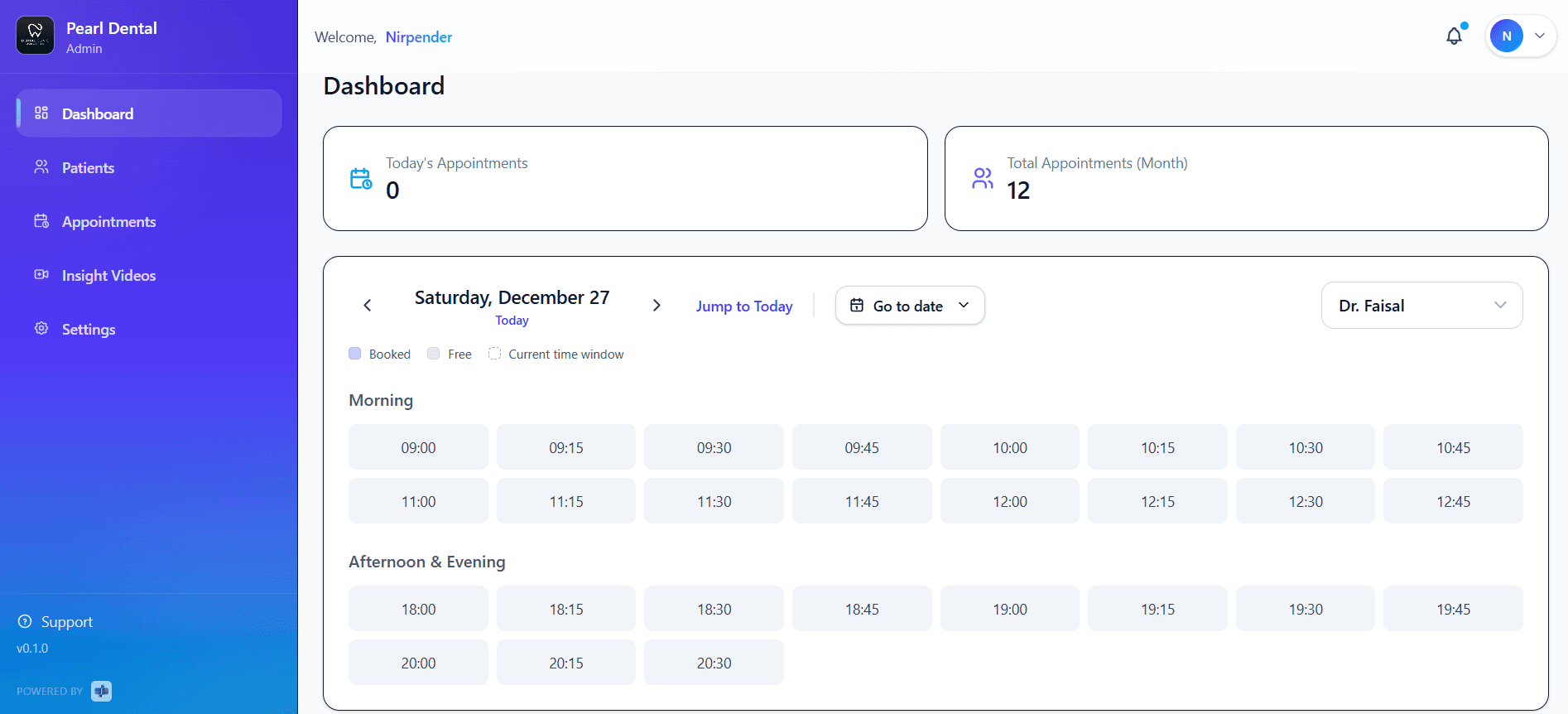
Dashboard & Insights
Today's appointments, monthly load, slot utilization, and quick actions.
Appointments
Smart calendar with "jump to today", slot states (booked/free), and provider filter.
Patients
Register or pull existing patients, UHID search, and complete clinical history.
Consultation & Notes
AI consultation: speech-to-structured notes, auto-save memory, printable Rx.
Imaging Automation
AI anomaly detection on intraoral, X-ray, and CT with real-time overlays.
Billing & Claims
Invoices, multi-location support, and export-ready reports.
Smarter Dental X-ray Analysis with AI
DeXi Transform routine dental scans into actionable insights, helping clinics deliver faster diagnoses and better patient communication.
Smart AI insights from dental scans
Automatically analyzes X-rays to surface key clinical observations in seconds.
Clear visual overlays for patients
Highlighted regions and color layers simplify complex diagnoses for better understanding.
Supports confident clinical decisions
Helps dentists explain findings visually, improving clarity and case acceptance.
AI-assisted scan insights for better diagnosis
Listening...
00:32
AI Generated Note
Complaint: Mild gum inflammation
Observation: Plaque in molar region
Plan: Scaling and oral hygiene guidance
Status: Advised and scheduled
AI-Powered Voice Clinical Notes
Turn real-time patient conversations into structured dental records without interrupting your workflow. DiagNotes listens, understands, and documents — instantly.
Real-time voice to clinical documentation
Captures conversations and converts them into structured dental notes instantly.
Auto-formatted treatment records
Generates clean, standardized notes ready for prescriptions and patient history.
Reduce manual work for doctors
Spend more time with patients while AI handles documentation in the background.
Simple plans as you grow
Transparent options for solo practices, group clinics, and multi-location chains.
Starter
₹150 / month
Best for single-chair or solo practices starting digital operations.
- Appointment scheduling & smart calendar
- Patient registration & UHID search
- Digital prescriptions & basic clinical notes
- Billing & invoice generation
- WhatsApp appointment reminders
- Secure cloud backup
Growth
₹350 / month
Designed for multi-doctor clinics needing speed, automation, and insights.
- Everything in Starter
- AI-assisted consultation notes (speech → structured)
- Imaging automation (intraoral, X-ray, CT)
- AI anomaly detection with overlays
- Provider-wise scheduling & filters
- Advanced reports & clinic insights
- Priority onboarding & support
Enterprise
₹650 / month
Built for chains, hospitals, and multi-location practices.
- Everything in Growth
- Multi-location & role-based access
- SSO & advanced security controls
- Custom workflows & integrations
- SFTP / bulk data exports
- Dedicated account manager
- SLA-backed support
Built with dental teams, validated in busy clinics
From single-chair setups to multi-location groups, DiagnoSee keeps teams coordinated and patients delighted.
"Simple to use and any issue is resolved promptly."
— Manish S., Multi-chair dental clinic
"Onboarding and support were excellent. The AI consult saves minutes every visit."
— Dr. Shubham
"Best patient management software; the new imaging features are game changers."
— Dr. Manisha P.
Frequently Asked Questions
Everything you need to know before getting started with DCMS.
Is DiagnoSee-Clinic suitable for small clinics?
Yes. DiagnoSee-Clinic is designed for both single-chair clinics and large multi-location practices.
What imaging types are supported?
DiagnoSee-Clinic supports intraoral images, X-rays, and CT scans with real-time AI overlays.
Is patient data secure?
Yes. We follow industry-standard encryption, access control, and secure cloud infrastructure.
Can DiagnoSee-Clinic integrate with existing workflows?
Absolutely. DiagnoSee-Clinic is flexible and can adapt to your clinic's current processes.